How to Convert Landscape Footage into Vertical Video
Published October 25, 2026 · 4 min read
Center crop, face-aware crop or blur-fill: the 16:9 to 9:16 maths, ffmpeg commands you can run yourself, and how each clip is framed.
The arithmetic of 16:9 to 9:16
A 1920×1080 frame is wide. A vertical video is tall, and the tallest 9:16 window that fits inside a 1080-pixel-high frame is 1080 × 9 ÷ 16 = 607 pixels wide. That is 32 percent of the frame's width (607 ÷ 1920). A full-height vertical crop throws away about two thirds of the picture.
The final file is 1080×1920, so the 607-pixel crop is then scaled up by a factor of 1.78 (1080 ÷ 607). Enlarging pixels makes the picture softer. A 4K source (3840×2160) gives a window 1215 pixels wide, which is scaled down to 1080, so the crop stays sharp. If you can choose, record at the higher resolution.
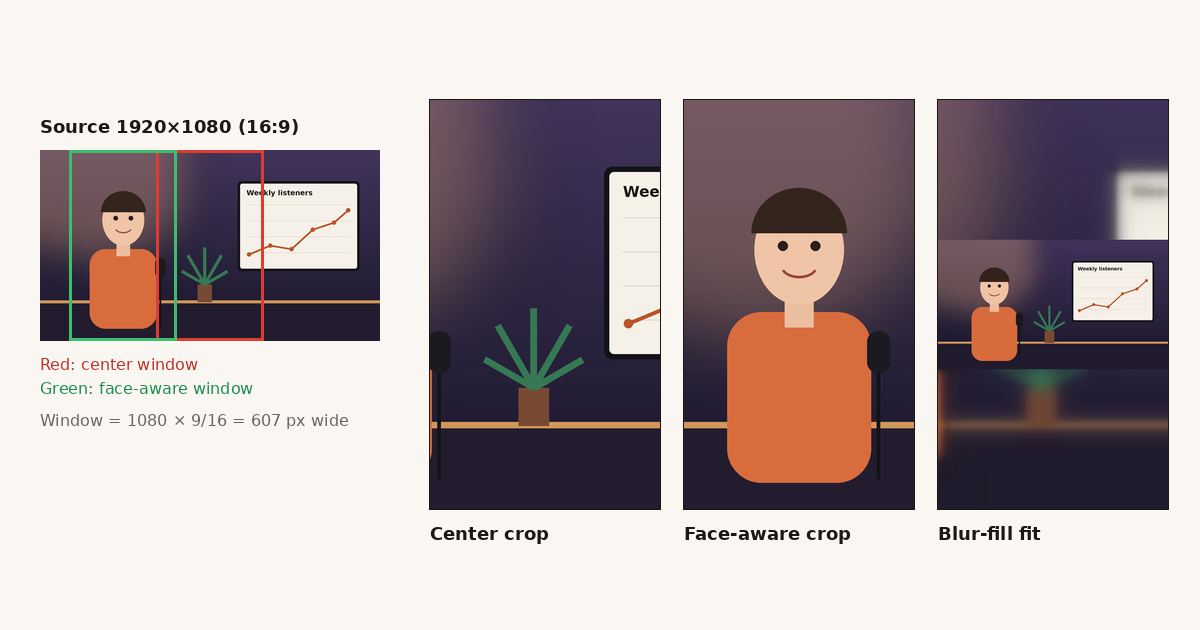
The same frame, framed three ways by the filters the renderer uses. The scene is an illustration drawn for this article.
Option 1: center crop
Take the middle 607 pixels and scale them up. This works when the subject sits in the middle of the frame and the sides hold nothing you need. It fails the moment someone stands off-center, as the left panel in the figure shows: the speaker is gone and half a chart is left.
Move the window so it is centered on the subject instead of on the frame. If the subject's center is at horizontal position c, the window starts at x = c - window ÷ 2, kept between 0 and the frame width minus the window width. In the figure the speaker's center is at 470, so the window starts at 470 - 303 = 167, and the encoder needs an even number, so 166.
This is what the AI Shorts generator does when it finds a face. It samples up to eight frames across the clip, finds faces with Amazon Rekognition, keeps the largest face in each frame and uses the median of their centers. The window is then fixed for the whole clip. It does not follow movement. A speaker who walks across a wide shot will leave the window, and with two people in frame the larger face decides.
Option 3: fit the whole frame over a blurred background
Instead of cutting, shrink the whole frame until it is 1080 pixels wide and place it in the middle of a 1080×1920 canvas. The empty bands above and below are filled with a blurred, enlarged copy of the same frame. Nothing is lost, which is why this is the right choice for slides, screen recordings, charts and cartoons.
Blur-fill with ffmpeg (the filter graph the renderer uses)
The graph blurs a small 270×480 copy and then scales it up. A blur this strong keeps no fine detail, so working on the small copy gives the same look in less time.
The cost is size. A 16:9 picture scaled to 1080 pixels wide is 608 pixels high, about a third of the 1920-pixel canvas. The subject is small and most of the screen is blur.
Which one the generator picks
How each kind of source is framed
Source
Framing
Landscape video with a face
Crop on the largest face
Landscape video with no face found
Blur-fill
Video that is already 9:16
Used as it is
MP3 or WAV
Black 1080×1920 canvas with captions
The choice is automatic and there is no manual switch. If a clip is framed badly, the most reliable fix is to change the footage: keep the speaker near the middle of the frame, or crop the video yourself with the commands above and upload the vertical version. The upload steps are in how to turn a podcast into YouTube Shorts.
Shooting for both shapes
Keep the subject inside the middle third of the frame. That is the part every crop keeps.
Keep graphics and lower-thirds away from the outer thirds, or they vanish in a center crop.
Record at 4K if you can. A crop from 4K stays sharp at 1080 pixels wide.
Leave headroom. A 9:16 window is tall, and it should not cut the top of a head.
Check the result
Confirm the dimensions and the pixel shape before you upload to a platform: