What happens between upload and download: transcription, ranking, snapping to word edges, face-based framing and rendering, and where it can go wrong.
The short version
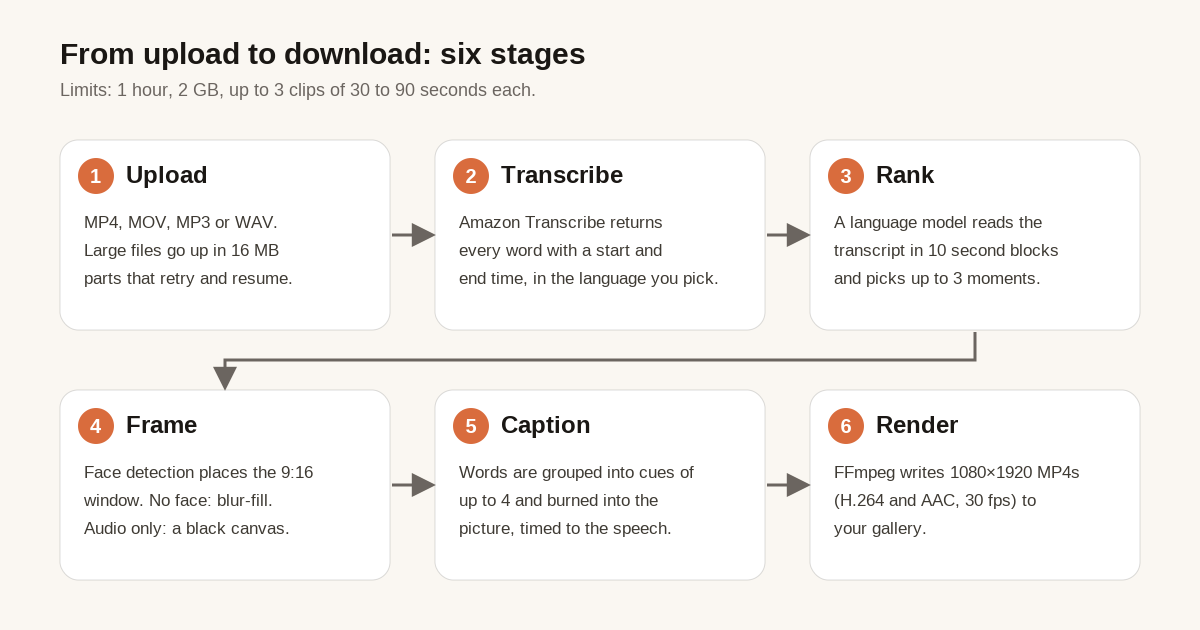
The AI Shorts generator turns one long recording into up to three vertical clips. It does this in six stages. A transcript tells the system what was said and when. A language model reads that transcript and picks the moments. Everything after that is mechanical: framing, captions and rendering.
The six stages between upload and download.
This article describes what each stage does and, just as important, what it cannot do. Knowing that tells you how to prepare a file and why a result sometimes disappoints.
Stage 1: upload
The page accepts MP4, MOV, MP3 and WAV files of 30 seconds to 1 hour and up to 2 GB, and checks the length and size before sending anything. Files over 16 MB are cut into 16 MB parts that upload several at a time. Each part is retried on its own, and the browser remembers which parts finished so a reload can pick up where it stopped. The file lands in private storage and is tied to your account. Only you can start a job on it.
Stage 2: transcription
Amazon Transcribe listens to the file and returns every word with a start and end time. You choose the language: English (US), English (India), Hindi, or auto-detect, which picks among those three. The whole file is transcribed in one language.
If the transcript has no words, the job stops with a message that no speech was detected. Retrying cannot fix that, because the cause is the file or the language setting.
Stage 3: ranking
This is the step that decides what you get. The transcript is grouped into blocks of 10 seconds, so an hour of speech becomes about 360 lines of text. Those lines go to a language model hosted on Amazon Bedrock, with a fixed set of instructions:
Find the most engaging, self-contained moments, at most three.
Each moment must last between 30 and 90 seconds.
Prefer a strong hook, an emotional peak or a complete thought.
Return a start, an end, a score and a short hook text for each moment, as JSON.
The model's answer is never trusted as it comes. Every segment is checked for valid times and for a length inside the 30 to 90 second window. An answer that is not valid JSON counts as no segments. Because the model works from 10 second blocks, its times land between words, so each boundary is then moved to the nearest word edge. A clip never starts or ends in the middle of a word.
Stage 4: framing
A 16:9 recording has to become 9:16. The renderer takes up to eight frames spread across the clip and sends them to Amazon Rekognition to find faces. From each frame it keeps the largest face and notes where its center sits. The 9:16 window is then centered on the median of those positions. That gives one window position for the whole clip.
A face was found: the window is placed on it.
No face was found, for example in a slide deck, a screen recording or a cartoon: the whole frame is scaled to fit over a blurred copy of itself, so nothing is cut off.
The source is already vertical: the window covers the full width and nothing is cropped.
The source is audio only: the clip uses a black 1080×1920 canvas.
The word timings from Stage 2 become caption cues of up to four words. The cues are burned into the picture with libass, a subtitle renderer, so they are part of the video file. Styles and the word-by-word highlight are described in how to add animated captions to Shorts.
Stage 6: rendering
Each clip is rendered by FFmpeg in its own container on AWS Fargate. The video is cropped or fitted, scaled to 1080×1920 at 30 frames per second, and encoded as H.264 with AAC audio at 128 kbit/s and 48 kHz. The finished MP4 goes into your gallery.
Where it goes wrong
Moments with little speech are invisible to the ranking. Interviews and lectures work better than music videos or silent demos.
The window is fixed for the whole clip. A speaker who walks across a wide frame can leave the window, and nothing follows them.
With two people in frame, the larger face wins. The other person can be cropped out.
A job is transcribed in one language. Mixed-language conversations will contain errors.
A second run on the same file can choose different moments, because the ranking comes from a language model.
At most three clips come back, even if the recording holds ten good moments.
How to get better results
Trim dead air and ads before you upload. Every second of filler is text the model has to read past.
Choose the transcript language yourself when you know it.
Use clean audio. A noisy recording produces a worse transcript, and the ranking is only as good as the transcript.
For wide shots with several people, expect the largest face to win and check the preview.
Split a long recording by topic and upload each part. Each upload returns its own three clips.
If a clip is close but not right, download it and trim the start or end in a video editor, or use one of the other two clips.
Your files are stored and processed by the AWS services named above. The privacy policy lists each service, what it receives and how deletion works.