Containers are not codecs. What MP4 and WebM hold, where each plays, how to convert between them with ffmpeg, and which one to upload.
A container is not a codec
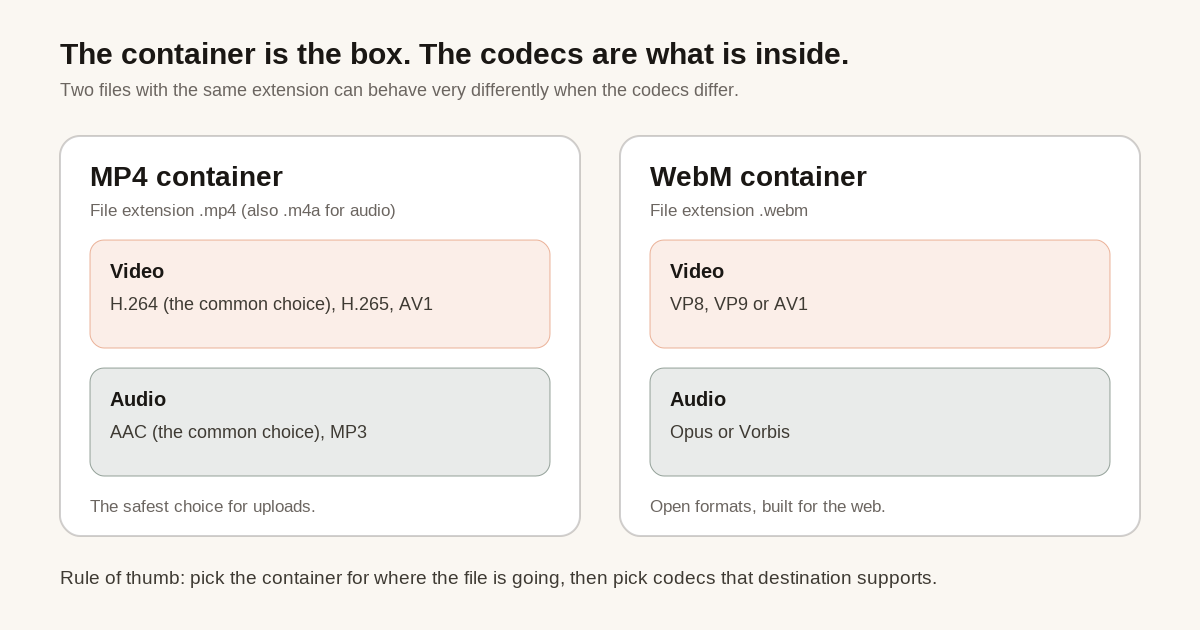
People say 'MP4 or WebM' as if they were two kinds of video. They are two kinds of box. A video file has a container (the box, shown by the file extension) and inside it one or more streams, each encoded with a codec. The container decides how the streams are packed together. The codecs decide how big the file is, how good it looks and which devices can play it.
The codecs each container usually holds.
MP4 and WebM compared
MP4
WebM
Video codecs
H.264 (the common one), H.265, AV1
VP8, VP9, AV1
Audio codecs
AAC (the common one), MP3
Opus, Vorbis
Origin
MPEG-4 standard family
Open format from the WebM Project
Best known for
Uploads, phones, editors, hardware playback
Video embedded in web pages
You can check what a file holds with ffprobe, which ships with ffmpeg. The container is in format_name and the codecs are in codec_name:
MP4 with H.264 video and AAC audio plays almost everywhere: phones, TVs, editors, browsers and every major upload form. That is why YouTube's recommended upload settings ask for an MP4 container with H.264 video and AAC-LC audio (Opus is also listed), and why the AI Shorts generator, the quiz video generator and the watermark tool all export an MP4 with H.264 video.
WebM plays in current versions of Chrome, Edge, Firefox and Safari. Safari added it later than the others (macOS got it in Safari 14.1), so older Apple devices may not play a WebM file. Many editors, phone galleries and social upload forms expect MP4 and handle WebM badly or not at all. YouTube does accept WebM, as its supported formats page shows.
Platforms change their rules, so read the current ones before you export for a specific site: YouTube's recommended upload settings are a good model for the others.
File size is mostly a codec and bitrate question
File size is bitrate times duration, and bitrate is what the encoder is told to spend. A newer codec such as VP9 or AV1 can reach the same visual quality with a lower bitrate than H.264, but it usually takes much longer to encode and may not decode in hardware on older devices.
Quality settings do not carry over between codecs. CRF 23 in x264 and CRF 32 in VP9 are each sensible defaults for their own codec, and they do not mean the same quality. Size also depends on the footage. We encoded a 6 second, 1080p test pattern with the two commands further down. The VP9 WebM came out at 4.99 MB and the H.264 MP4 at 4.67 MB, so the newer codec was larger. A synthetic test pattern is unusually hard to compress, so treat that as a warning against generic claims, not as a benchmark. Test on your own footage.
-crf sets quality: lower numbers mean higher quality and bigger files.
-pix_fmt yuv420p keeps the pixel format that the widest range of players can decode.
-movflags +faststart moves the index to the start of the MP4, so it can begin playing before it has fully downloaded. YouTube's recommended settings ask for it.
Converting always re-encodes the video, which costs a little quality each time. Convert once, from the best original you have.
What the Indifferent tools accept and produce
Formats by tool
Tool
Accepts
Produces
AI Shorts generator
MP4, MOV, MP3, WAV
1080×1920 MP4 (H.264, AAC)
TXT to quiz video
TXT file
1080p MP4
Watermark tool
JPG, PNG, WebP, MP4, WebM, MOV
PNG or JPEG for images, MP4 for video
A WebM file therefore works in the watermark tool but not in the AI Shorts generator. Convert it to MP4 with the command above before you upload it for clipping. The podcast guide has more ffmpeg commands for files that are over the upload limits, and the watermark guide covers the browser export in detail.
Which should you choose
Uploading to a social platform, sending to a client or editing in desktop software: MP4 with H.264 and AAC.
Embedding a video in your own web page and wanting an open format: WebM is a fair choice, but offer an MP4 as well for older Apple devices.
Shrinking a large archive for your own use: try VP9 or AV1 and measure the size on your footage before you commit.
Not sure: MP4 with H.264 and AAC. It is the format with the fewest surprises.